
Banarasi Saree Studio

A free Gemini photo prompt for saree looks. Works best with a sharp reference photo.

The prompt

Create a studio portrait of the woman in my uploaded photo in a maroon Banarasi silk saree with rich gold weave, traditional jewellery, soft softbox light, dark warm backdrop. Preserve the exact facial structure, eyes, nose and skin tone from the uploaded photo. Do not beautify or alter.

How to use it

  1. Copy the prompt below.
  2. Open Gemini and upload a clear, front-facing reference photo.
  3. Paste the prompt and send it.
  4. If a feature looks off, follow up with a short correction, or run it again.

Tips for a better result

  • Use good, even lighting in your reference photo.
  • Keep the face-preserve line in the prompt.
  • Change one detail at a time, such as outfit or background, to refine.

More: all saree prompts, keep your face consistent, prompt builder.
Related saree prompts

Red Silk Saree Portrait

Create a traditional portrait of the woman in my uploaded photo in a red silk saree with gold zari border, temple jewellery, marigold garlands in the background, warm soft light, graceful pose, 4K. Preserve the exact facial structure, eyes, nose and skin tone from the uploaded photo. Do not beautify or alter.

Pastel Saree Garden Look

Generate a portrait of the woman in my uploaded photo in a pastel chiffon saree in a blooming garden, morning sunlight, soft breeze in the pallu, dreamy tone, shallow depth of field. Preserve the exact facial structure, eyes, nose and skin tone from the uploaded photo. Do not beautify or alter.

Heritage Red Saree Courtyard

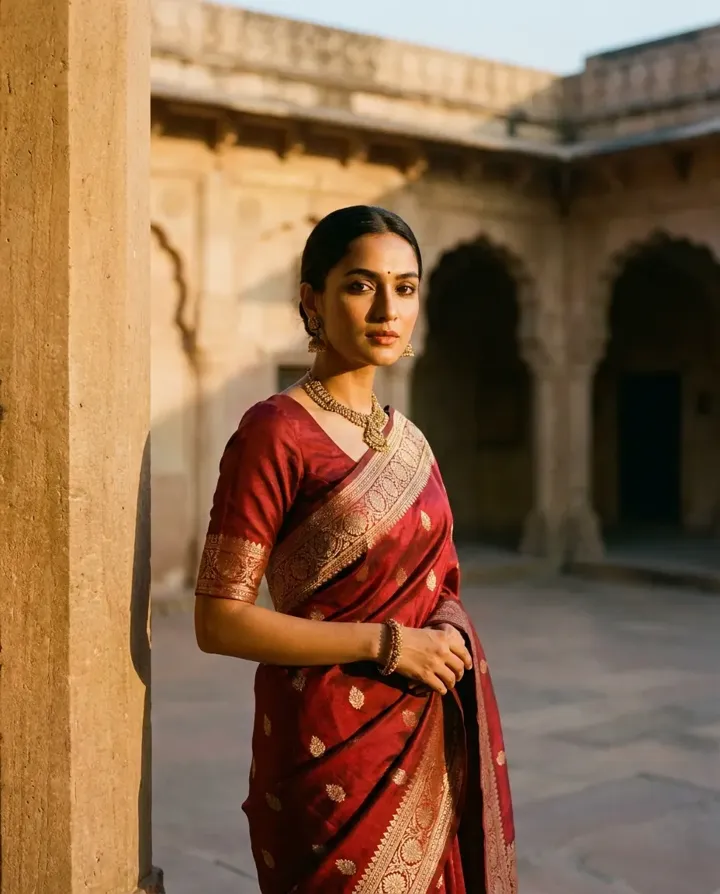
Create a portrait of the woman in my uploaded photo in a deep red silk saree with a gold zari border, standing in an arched sandstone haveli courtyard at warm dusk, one hand resting on the pallu, subtle traditional jewellery, soft directional light, 85mm lens, realistic skin. Preserve the exact facial structure, eyes, nose and skin tone from the uploaded photo. Do not beautify or alter.

Copied!